# Binary Numbers and Branching --- CS 130 // 2025-09-08 <!--=====================================================================--> # Announcements <!-- .slide: data-background="#004477" --> <!--=====================================================================--> ## Tutoring Lab is Open - Cowles Library 201 - Sundays - Wednesdays 6-9pm - Please be understanding if they're not always able to help with CS 130 <!-- - Book an appointment on Starfish [(instructions)](https://docs.google.com/document/d/1sB0YBdHBPUNXCMM1czJjxiGcQ2EGd7d0/) - [Schedule and course coverage](https://docs.google.com/spreadsheets/d/1Ohjo8hIbgxouz_y8qpK0tCYCnoWU9q9GeO34-7Xs_oM/)  --> <!--=====================================================================--> # Review <!-- .slide: data-background="#004477" --> <!--=====================================================================--> #### Assignment 1 due today - [Assignment 1](../../assignments/assignment-1/): Write a program that interacts with the user and performs some kind of computation based on their input - Find other syscall codes in Figure B.9.1 of the textbook <!----------------------------------> ## System Calls - We can make **system calls** to have the system perform things like input and output - Put the system call code in `$v0` - Put argument in `$a0` (and maybe `$a1` if needed) <!----------------------------------> #### Output a string - a 4 in `$v0` means *print a string* - **address** of the string should be in `$a0` - `la` means *load address* - contrast with `lw` - use when you want the data *at the address* not the address itself, so use `lw` if you want to print an int ```mips .data message: .asciiz "Hello!" .text li $v0, 4 #4 is the code for printing a string la $a0, message #the argument for the syscall syscall ``` <!----------------------------------> #### User Input - a 5 in `$v0` means *read an integer* - whatever the user types gets put into `$v0` during the syscall ```mips .data prompt: .asciiz "Enter an integer:" .text li $v0, 4 #4 is the code for printing a string la $a0, prompt #the argument for the syscall syscall li $v0, 5 #5 is the code for reading an integer syscall ``` <!--====================================================================--> # Logical Operations <!-- .slide: data-background="#004477" --> <!--====================================================================--> ## Boolean values - Suppose I create a `bool` variable in Python: ```py b = True ``` - <!-- .element: class="fragment"--> How many bits of memory were just allocated? + <!-- .element: class="fragment"--> An entire word! + <!-- .element: class="fragment"--> `b` is a **memory address** that "points to" `True` <!----------------------------------> ## Logical operator investigation <div class="twocolumn" style="font-size: 80%"> <div> Before executing: guess what you think `$t0`-`$t5` will be Execute it: were you right? Is this how `and` and `or` behave in Python? </div> <div> ```mips .text li $s0, 0 li $s1, 1 li $s2, 2 li $s3, 3 and $t0, $s0, $s1 or $t1, $s0, $s1 andi $t2, $s1, 1 ori $t3, $s1, 0 or $t4, $s1, $s2 and $t5, $s2, $s3 ``` </div> <!--=====================================================================--> # Binary Numbers <!-- .slide: data-background="#004477" --> <!--=====================================================================--> # CS Jokes  <!-- .element width="300px" --> Source: https://www.amazon.com/Types-People-understand-Binary-T-Shirt/dp/B07PSPLSC9 <!--=====================================================================--> ## Let's talk about how counting works 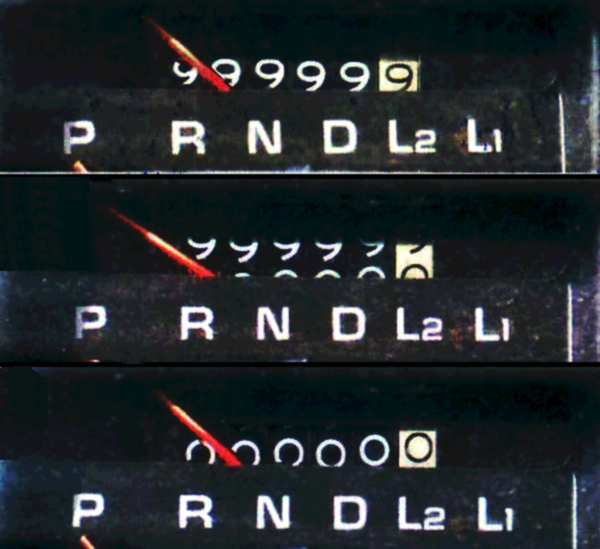 <!-- .element width="300px" --> <!-- image credit: https://en.wikipedia.org/wiki/Odometer#/media/File:Odometer_rollover.jpg --> How do you count if you only have two digits? <!--=====================================================================--> ## Counting in Binary - CPUs compute in **binary** using the contrast of low/high voltages to mean 0 and 1 - the two _binary digits_ or **bits** - So how do we encode **numbers** in binary? <!--=====================================================================--> ## Base 10 (AKA Decimal) - When we write 437 we usually mean base 10 - the number system with 10 digits - Can also write it as $437_\text{ten}$ - $437_\text{ten}$ means `$$(4\cdot 100)+(3\cdot 10)+(7\cdot 1)$$` or `$$(4\cdot 10^2)+(3\cdot 10^1)+(7\cdot 10^0)$$` <!--=====================================================================--> ## Base 2 (AKA Binary) $1101_\text{two}$ means `$$(1\cdot 8)+(1\cdot 4)+(0\cdot 2)+(1\cdot 1)$$` or `$$(1\cdot 2^3)+(1\cdot 2^2)+(0\cdot 2^1)+(1\cdot 2^0)$$` <!--=====================================================================--> ### Demo: Let's convert numbers to different bases - $110110101_\text{two}$ - $437_\text{ten}$ <!--=====================================================================--> ### Exercise: Practice with Binary - Convert the following number into decimal: + $1011010_\text{two}$ - Convert the following decimal number into binary: + $277_\text{ten}$ <!--=====================================================================--> ### Base 16 (AKA Hexadecimal) - Hexadecimal is base 16 - digits 0, 1, 2, 3, 4, 5, 6, 7, 8, 9, A, B, C, D, E, F - 5C means `$$(5\cdot 16)+(12\cdot 1)$$` - Easy to convert back and forth from binary <!--=====================================================================--> ### Counting in Binary/Hexadecimal <div class="twocolumn" style="font-size: 75%"> <div> <table> <tbody> <tr> <th>Decimal</th> <th>Binary</th><th>Hex</th></tr> <tr> <td>0</td> <td>0000</td> <td>0</td></tr> <tr> <td>1</td> <td>0001</td> <td>1</td></tr> <tr> <td>2</td> <td>0010</td><td>2</td></tr> <tr> <td>3</td> <td>0011</td> <td>3</td></tr> <tr> <td>4</td> <td>0100</td><td>4</td></tr> <tr> <td>5</td> <td>0101</td><td>5</td></tr> <tr> <td>6</td> <td>0110</td><td>6</td></tr> <tr> <td>7</td> <td>0111</td><td>7</td></tr> <tr> <td>8</td> <td>1000</td> <td>8</td></tr> </tbody> </table> </div> <div> <table> <tbody> <tr> <th>Decimal</th> <th>Binary</th><th>Hex</th></tr> <tr> <td>9</td> <td>1001</td> <td>9</td></tr> <tr> <td>10</td> <td>1010</td><td>A</td></tr> <tr> <td>11</td> <td>1011</td> <td>B</td></tr> <tr> <td>12</td> <td>1100</td><td>C</td></tr> <tr> <td>13</td> <td>1101</td><td>D</td></tr> <tr> <td>14</td> <td>1110</td><td>E</td></tr> <tr> <td>15</td> <td>1111</td><td>F</td></tr> <tr> <td>16</td> <td>0001 0000</td><td>10</td></tr> <tr> <td>17</td> <td>0001 0001</td><td>11</td></tr> </tbody> </table> </div> </div> <!--=====================================================================--> ### Exercise: Exploring in Mars - Open up Mars and create a `.asm` file - Put the number 302 in your data section - How does Mars display that in Hex? - What is the Binary equivalent? <!--=====================================================================--> ### Exercise: Convert back and forth - Convert the following binary number into hex - $\text{1111 1010 0001 1011 0100 1110 0010 0011}_\text{two}$ - Convert the following hexadecimal number into binary - $\text{00FF33AA}_\text{hex}$ <!--====================================================================--> # Conditionals <!-- .slide: data-background="#004477" --> <!--====================================================================--> ## Branching - **Branching** allows MIPS programs to skip around to different parts of the program - Useful for - conditional statements (if, if-else, etc.) - loops <!----------------------------------> - continue executing at the line labeled `my_label` ```mips b my_label #... my_label: ``` - <!-- .element: class="fragment"--> continue executing at the line labeled `my_label` if `$s0` and `$s1` are equal ```mips beq $s0, $s1, my_label ``` - <!-- .element: class="fragment"--> continue executing at the line labeled `my_label` if `$s0` and `$s1` are _not_ equal ```mips bne $s0, $s1, my_label ``` <!--====================================================================--> ## Compiling an `if` Statement <div class="twocolumn" style="font-size: 60%"> <div> ```python if i == j: k = 1 print("The value of k is",k) ``` </div> <div> ```mips .data i: 5 j: 8 k: 0 message: .asciiz "The value of k is " .text lw $s0, i lw $s1, j bne $s0, $s1, disp_msg li $s2, 1 sw $s2, k disp_msg: li $v0, 4 #4 is the code for printing a string la $a0, message #the argument for the syscall syscall li $v0, 1 #1 is the code for printing an int lw $a0, k #the argument for the syscall syscall ``` <div> <!----------------------------------> ## Exercise - Run the above program in Mars, observe the output - Change it so `i` and `j` are equal, run again - Translate the following Python program into MIPS ```python if i == j: k = 1 else: k = 2 print("The value of k is",k) ```